
Experience the power of customization using
Pinpoint in Xplorer
Within Xplorer, Pinpoint allows users to modify records within a database report quickly and efficiently.
We make every effort to manually verify site locations to ensure accuracy. However, discrepancies may occasionally arise due to variations or inconsistencies in government and agency data sources. To address this, we developed Pinpoint, which enables users to review and adjust location information as needed.
This feature is only available on a company-approved basis. Clients who would like to use Pinpoint must have their senior management’s approval to ‘opt-in’ – to have it activated for all subsequent reports delivered through their Xplorer platform.
Want to Get Started?
Pinpoint is available now!
Connect with your Regional Account Manager.
Want to learn more about Pinpoint or ERIS Xplorer?
Sign up for a walk through demo.
Pinpoint is easy to enable within Xplorer
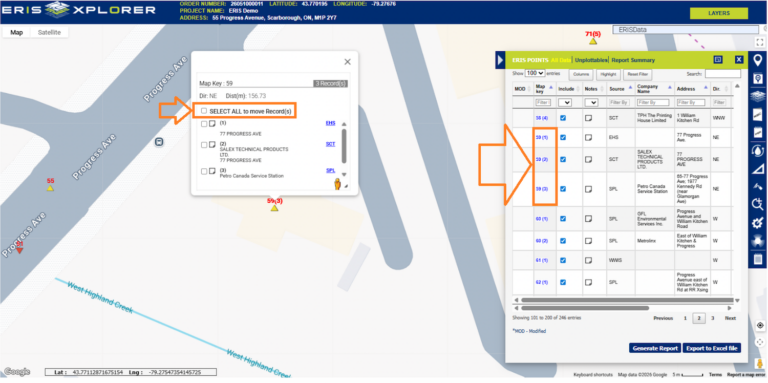
Once activated, select records:
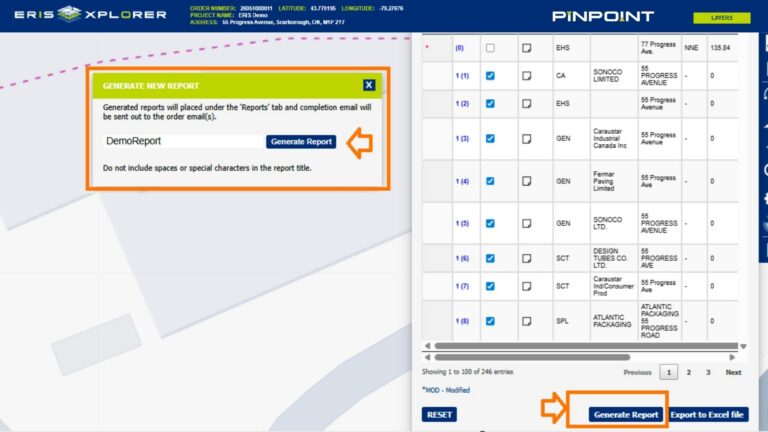
Customize & generate your revised report:
What is ERIS Xplorer?
Take a tour of ERIS Xplorer
What to learn more about Pinpoint?
Request More Information
Please fill in the following form and an ERIS Representative will contact you shortly.